For small restaurants

Take orders on the phone you already have.

An order is shouted across the room, written on a pad, and lost somewhere between the table and the kitchen. At closing, the day's takings are remembered or added up on a phone. WizPOS puts the menu on a QR code, sends every ticket to a kitchen screen, and keeps the day's money in one place. No POS machine to buy, nothing your staff needs training for.

The demo is the real app with a sample menu and live orders. No card, no sign-up. Get it on Android

No commission on your sales Paid straight to your own account No contract, no setup fee
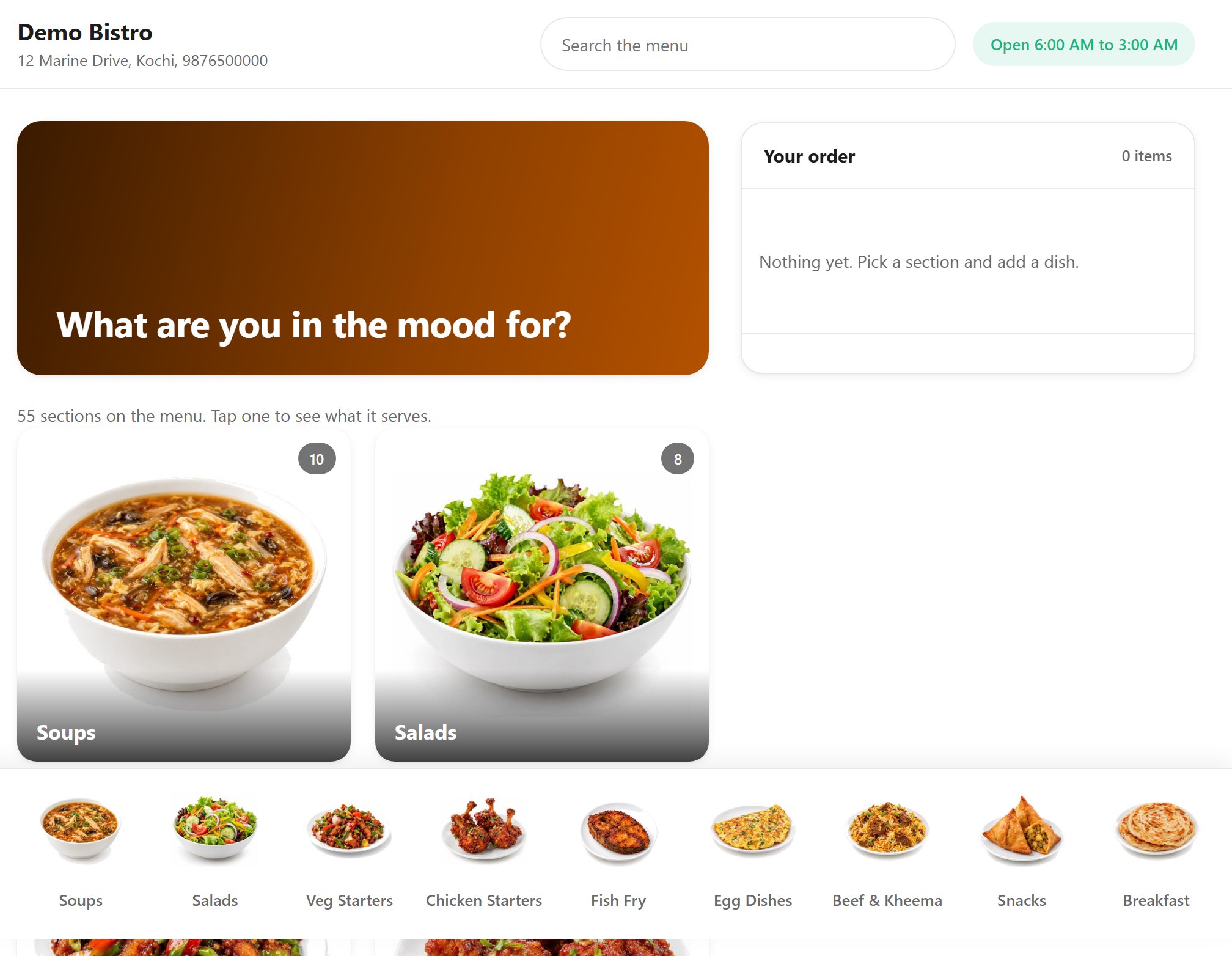
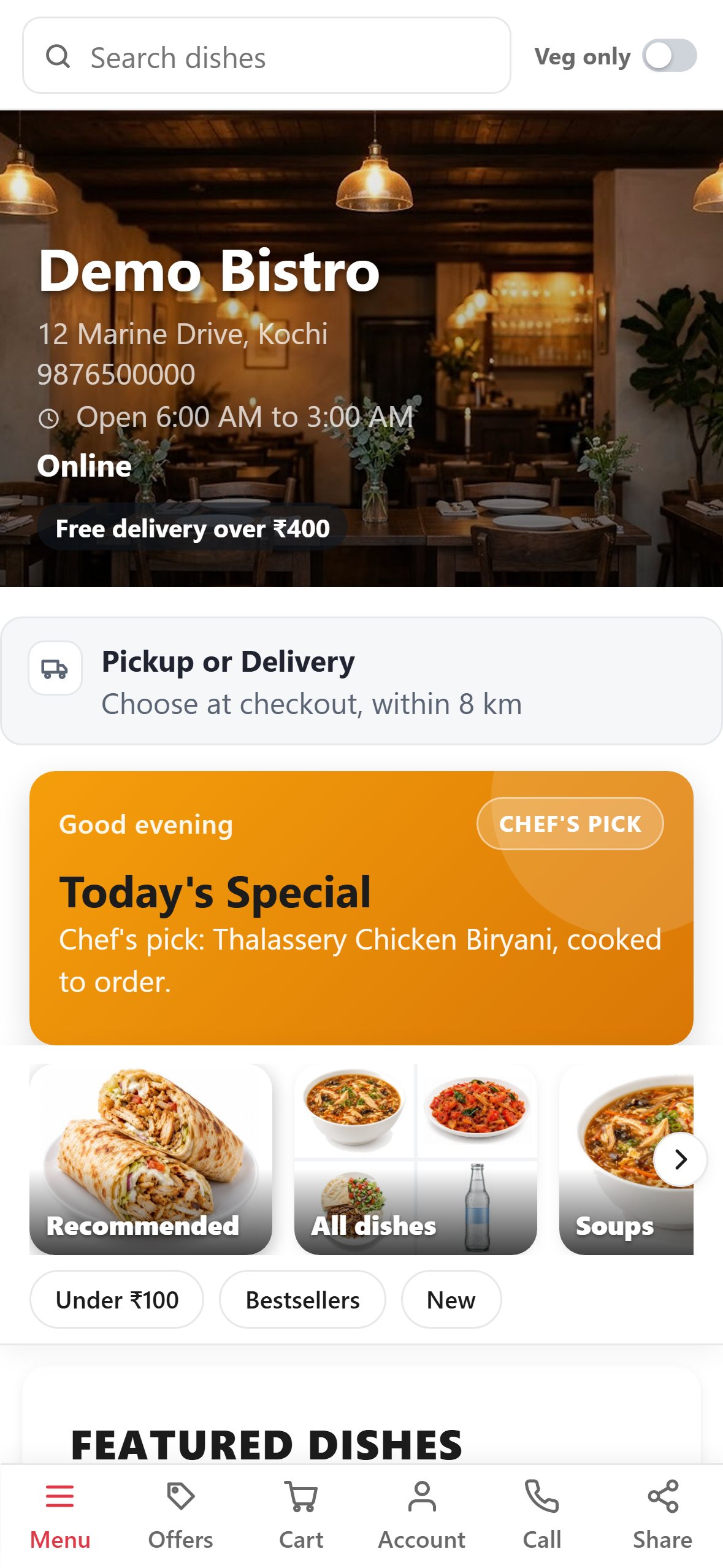
The live demo store on a phone: the Demo Bistro header, category filters, and dishes with photos, prices and an Add button.
40 to 60 dishes
already priced for the kind of kitchen you pick, from a catalogue of 922
No ceiling
on the team roster, whatever you pay: attendance, shifts and time off for everybody
0%
commission on what you sell
7 days
of selling the till keeps if the internet drops

Three things cost a small kitchen money every week

Most software in this market is built for chains with an accountant. This is built for one kitchen and the people standing in it.

The order never reaches the kitchen

It is shouted across the room, written on a pad, and lost between the table and the pass. The customer asks twice, and the food arrives late or twice.

Every order becomes one ticket on the kitchen screen the second it is placed, with its age counting up.

Nobody knows what the day took

At closing, the takings are remembered, estimated, or added up on a phone calculator. The cash in the drawer is counted against nothing, so a short drawer is found a week later or never.

Sales, cash and card are worked out as you trade. At close the drawer is counted against them, and the difference is on the screen before anybody goes home.

The kitchen can read yesterday's takings

One shared login means every screen shows everything, and the report never says which of your staff took the money.

The kitchen screen has no prices on it at all. Each sale is tagged to the person who rang it up, and every payment is recorded against a name.

The four screens your team uses

Nothing hidden behind a sales demo. This is what the customer sees, what the kitchen sees, what the counter sees, and what you see at closing time.

Customer menu

The customer menu on a phone: the Demo Bistro header, category filters, and dishes with photos and prices.
  • Nothing to installThe menu opens in the customer's own browser. No app, no account, no card details.
  • Every table has its own codeA sticker per table, desk or counter, so the order arrives as Table 3 and not as a mystery.
  • Prices are the store's, alwaysVeg or non-veg, photo or no photo, and VAT handled the way the store is registered.

Kitchen screen

The kitchen screen on a tablet: tickets in New and Preparing, each with what to cook and how long it has waited, and no prices anywhere.
  • Three states, one tapNew, Preparing, Ready to serve. The cook never opens a menu to find anything.
  • No money on this screenPrices, totals and payment status are stripped out before the ticket reaches the kitchen.
  • The oldest ticket is never the lost oneEvery ticket counts its own age, and the board is ordered by how long it has waited.

Counter till

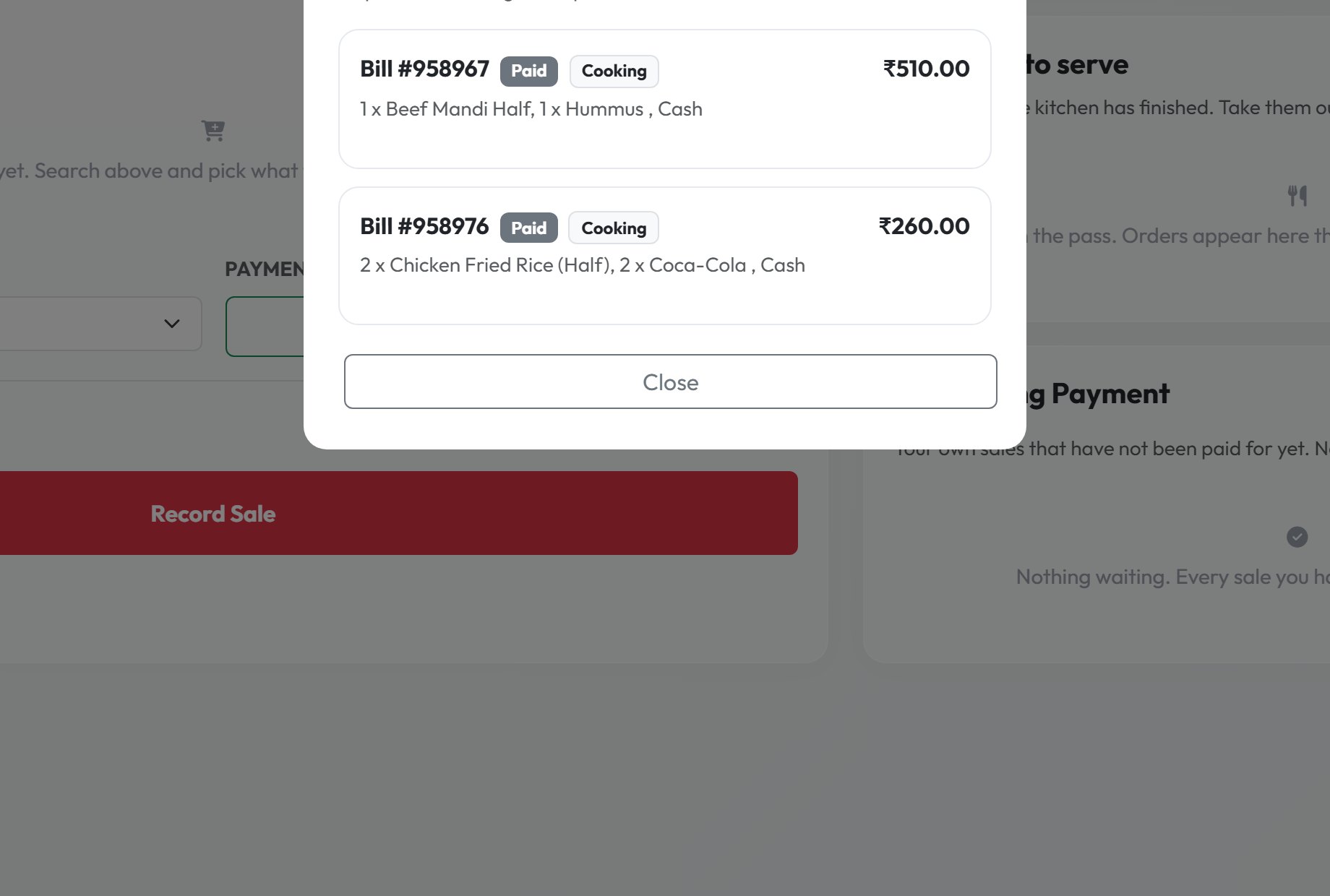
The counter till with a sale rung up: the item in the bill, the order source, Cash or Card, and the total.
  • Fewer taps than a tillType three letters, tap the dish, done. It is built to be used one handed during a rush.
  • Cash or Card, recorded either wayCard is preselected, and the money goes to the store's own account, never through WizPOS.
  • Every sale has a name on itWho rang it up and who took the money are both recorded, which is what makes a drawer add up.

Owner reports

The owner's screen: takings, order count, cash against card and the average ticket, for the last seven days.
  • The day, without the arithmeticTakings, order count, cash against card, and the same figures for yesterday and last week.
  • Which dishes actually sellRanked from real orders, so a menu can be trimmed on evidence instead of opinion.
  • Day close, with the drawer countedCash and Card are reconciled when the shop shuts, and the day is filed away for good.
When the internet drops

Selling does not stop because the line does.

A fibre cut during the evening rush used to mean turning customers away. Now the till keeps taking orders on its own for up to 7 days, and sends them the moment the connection is back.

  • Sales are held on the deviceNothing is lost and nothing is double charged. The order is written down locally and shown as waiting.
  • They send themselves when it returnsNo button to press and nobody to remind. The sale reaches the books within seconds of the line coming back.
  • A sale timed at 8pm stays an 8pm saleThe moment it was taken is what is recorded, so a night's takings cannot land in the wrong day.
#398 2x Chicken Biryani waiting on this device
#399 1x Flat White waiting on this device
#397 3x Alfaham Half sent, in today's takings

The counter screen shows the queue while it is offline, so nobody has to remember what was written on the pad.

What the food costs, and what is left on the shelf

A kitchen that does not count what it buys prices its menu by feel. This part of the product counts it, from the delivery note to the plate, and it stays out of the way for a store that would rather not bother with it.

The shelf: each ingredient in the unit the shop buys it in, what is left, what it cost, and the one that is already flagged as time to reorder.

The shelf, in your own units

Add an ingredient with the unit you buy it in: kilogram, gram, litre, millilitre, piece, pack or dozen. What it costs and who it is bought from sit beside it, and a delivery bill raises the shelf on the day the goods arrive.

  • Seven units: a delivery note is typed in the unit it was written in, rather than converted into one the software prefers.
  • What it cost: the cost per unit is what you paid on average, so a price rise moves the shelf the day the new stock lands.
  • Who it comes from: each ingredient names its supplier, and the supplier's own screen keeps the bills and what is still owed.
One dish's recipe: what goes into a single portion, in the units the shelf uses, and the cost worked out from those ingredients.

Every sale takes the shelf down by itself

Write a dish's recipe once, in the same units as the shelf, and every sale takes those ingredients off it with nobody writing anything down. A dish with no recipe is normal: it sells exactly as it did before and simply waits for its recipe.

  • A recipe per dish: what goes into a single portion, entered in the units the shelf already uses.
  • Once per order: the deduction follows the recipe even when the till sends the same order again, so a re-sent ticket cannot take the rice off twice.
Dish costs: what each dish sells for, what its ingredients cost, and what is left after on every plate.

What one plate costs, and what the day cost

A dish costs what its ingredients cost today, so a rise in the price of chicken moves the cost of the biryani that same afternoon. Against the day's takings it becomes food cost as a share of what was sold, on the owner's board beside the wastage and the value of the shelf.

  • Food cost as a share: what the ingredients cost against what was sold, read beside the wastage and the value of the shelf.
  • Costed at today's price: a dish is worked out from what its ingredients cost now, not from what they cost when the menu was written.
The stock report: how long the shelf will last, the wastage recorded, and the items below their reorder level with the amount to buy.

Wastage, with a reason

Expired, damaged, spoiled, spilled, burnt, a staff meal or a free sample: stock leaves the shelf with the reason attached, and every one of them carries its cost into the day. A loss that is written down can be argued with. Oil poured away quietly cannot.

  • Eight reasons: expired, damaged, spoiled, spilled, burnt, a staff meal, a free sample, or other. Each is recorded in the kitchen's own words.
  • What it cost the day: the value of what was thrown away lands in the day's figures beside the food cost, instead of in a notebook.
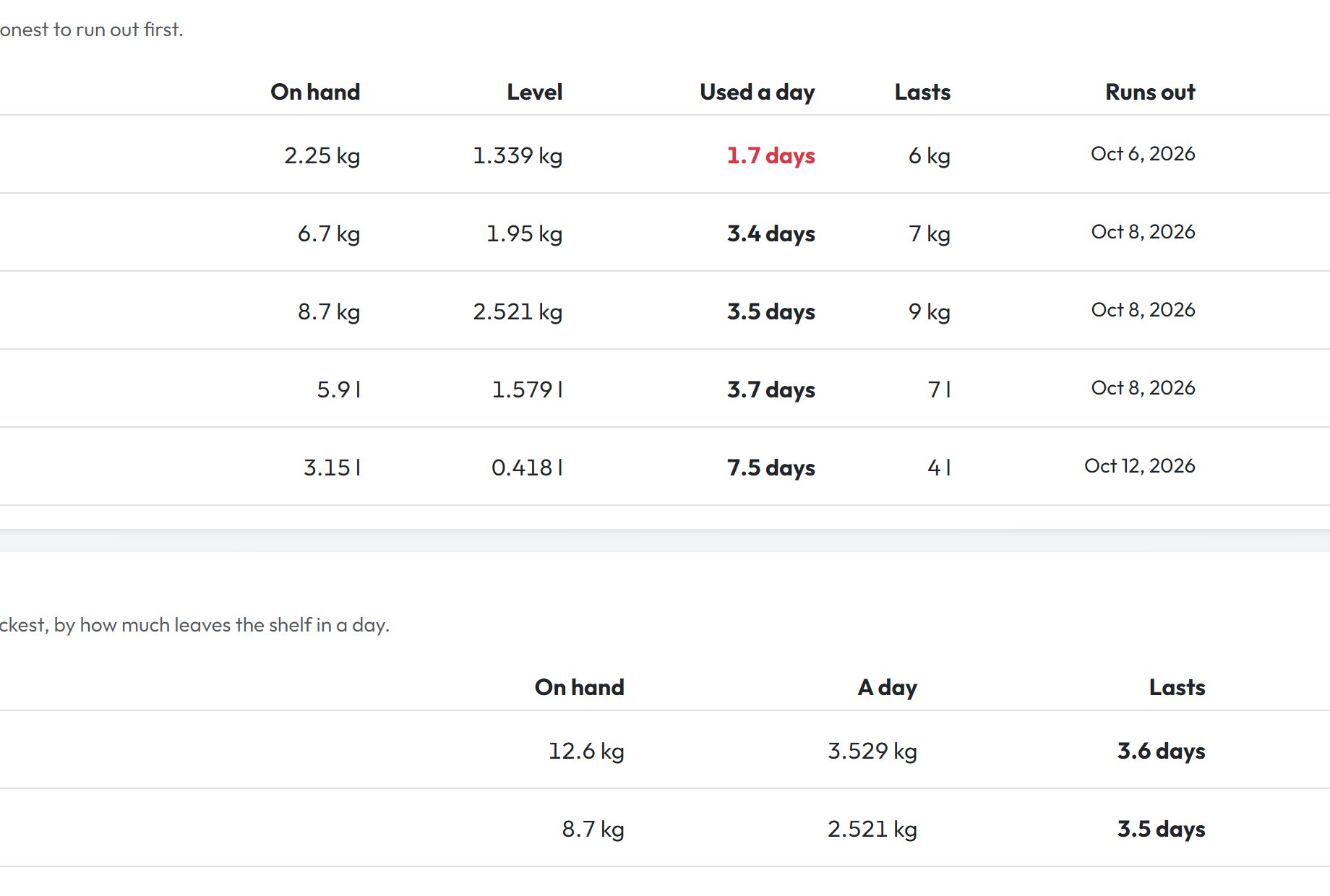
The stock report's reorder list: each item sitting below its level, the days it will last at the rate the kitchen is really using it, and the button that puts the amount to buy onto a delivery.

What needs buying, and how long it lasts

Set a reorder level and an item joins the list when it falls below it, with the days it will last at the rate the kitchen is really using it. An item that is not moving gets no days figure rather than a flattering one. One button puts everything that is short onto a delivery at the amount to buy, and the same list can reach the store's own inbox at eight in the morning.

  • Below its own level: each item carries the level you set beside the count, so the list is a number to act on rather than a feeling.
  • Days it will last: worked out at the rate the kitchen is really using it, with no figure at all for an item that is not moving.
  • In the inbox at eight: the same list reaches the store's own inbox every morning, before the day starts.
The bills written off over the chosen range, grouped by the reason each one was given, with what each was worth and who cancelled it.

A cancellation follows the kitchen

A bill cancelled before the kitchen touched it puts its ingredients back, because nothing was used. A plate that was cooked and then thrown away keeps its deduction, so a day that wasted a meal cannot look better for the cancellation. A bottle of water that goes back in the fridge was never cooked, and a bill merged into another puts nothing back at all.

  • Cancelled before the kitchen started: the ingredients go back on the shelf, because nothing was used.
  • Cooked, and then thrown away: the deduction stays put, so a day that wasted a meal cannot look better for the cancellation.

Set up in an afternoon

You do not need to photograph every dish or type out your whole menu before you start.

An owner standing at a table in their restaurant before service, setting up the menu on a tablet.
Step one, about an hour

Build your menu

Say what kind of kitchen you run and the menu opens already written: twelve kinds, from a biryani house to a bakery, each with between 40 and 60 dishes priced and filed in their own sections. Delete what you do not serve, change any price, and add your own items up to the package's menu size.

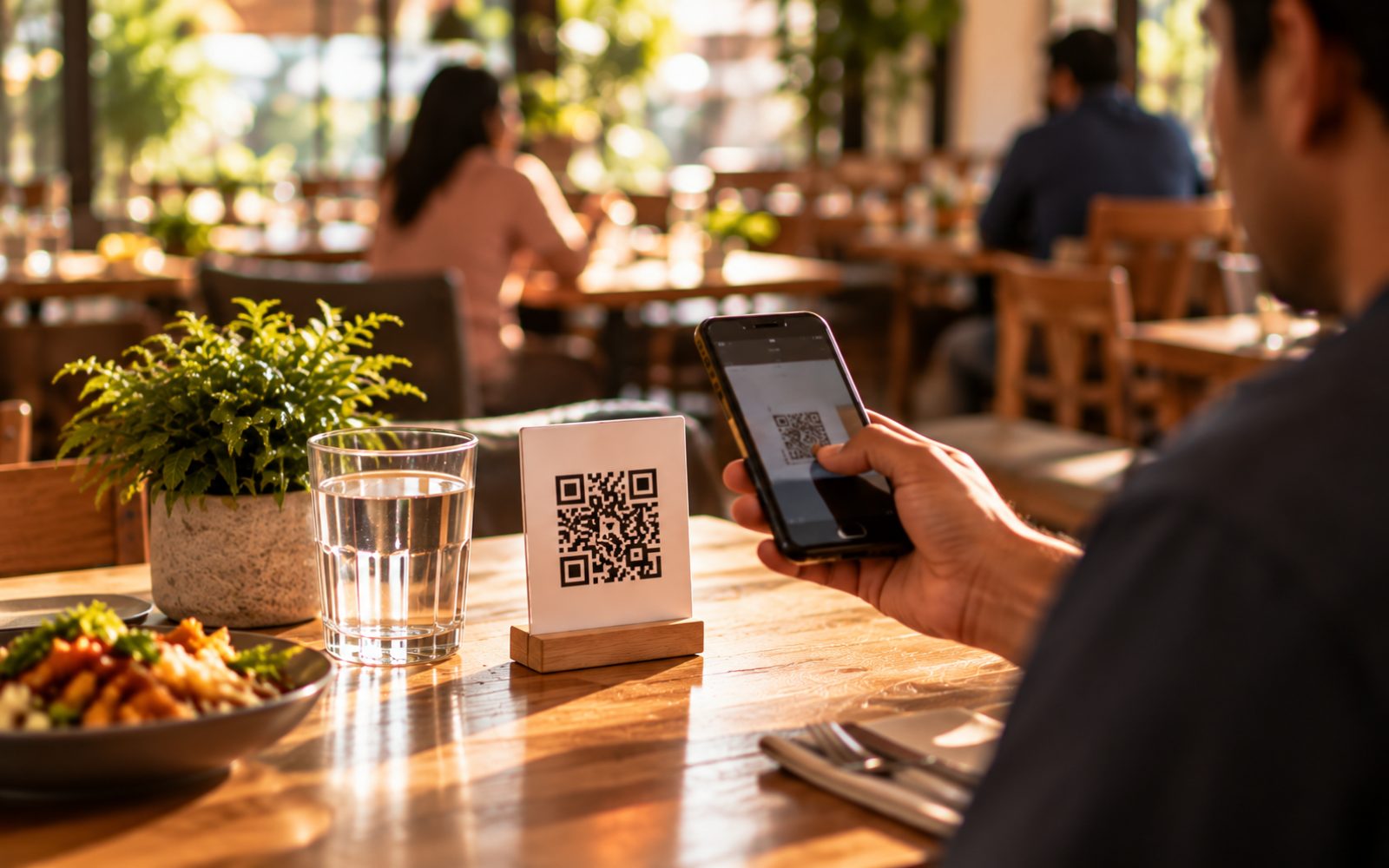
A printed code standing in a small card holder on a cafe table, with a customer's phone held over it to scan.
Step two, ten minutes

Print your codes

You get a separate link for each table, desk or counter, so you always know where an order came from. Any free QR generator turns a link into a sticker.

A cook at the pass glancing at the order screen during service, tickets clipped beside the hatch.
Step three, same day

Start taking orders

Orders land on the kitchen screen and the counter board at the same moment. Nothing to install on any machine, and nothing to buy.

Who sees what

Every staff account can only do the job it was made for. This is the part owners ask about first.

Role Signs in with Can do Sees amounts
Owner Email and password Everything, including reports and store settings Yes
Manager Email and password Orders, the menu, the team and the settings for day to day running Yes
Kitchen Username and 4 digit PIN Move orders through the kitchen: new, preparing, ready No
Counter Username and 4 digit PIN Take counter orders, and collect payment for their own sales only Yes

The kitchen also cannot ring up a sale. A cook who can take money is a cook who can take money.

Your menu is the shop window

Products carry a photo, so the customer sees the dish instead of reading a line of text. Pictures come straight from the phone in your pocket.

And the rest of it

The rest of what is built and working, all included in the price.

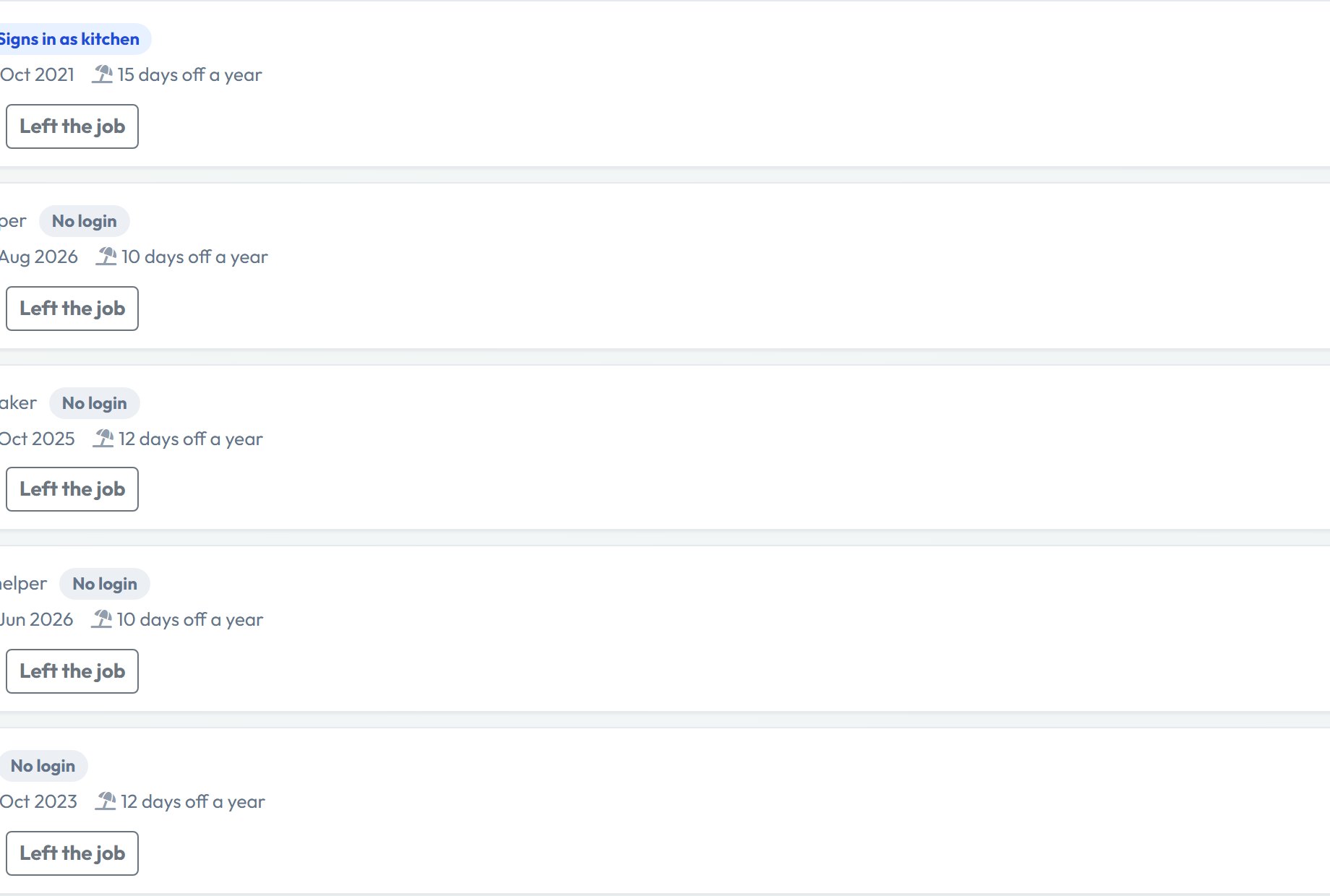
The team list: everyone who works here, with their job, whether they sign in, and the days off they have booked.

The whole team, on a roster

Everybody who works here gets a place on the roster, whether they sign in or not. Mark who turned up, set the week's shifts, book time off, and see a warning when a certificate or a licence is about to run out. Your cook, your tea maker and your cleaner are on the list beside the counter staff, and only the people who actually take orders use up a selling place.

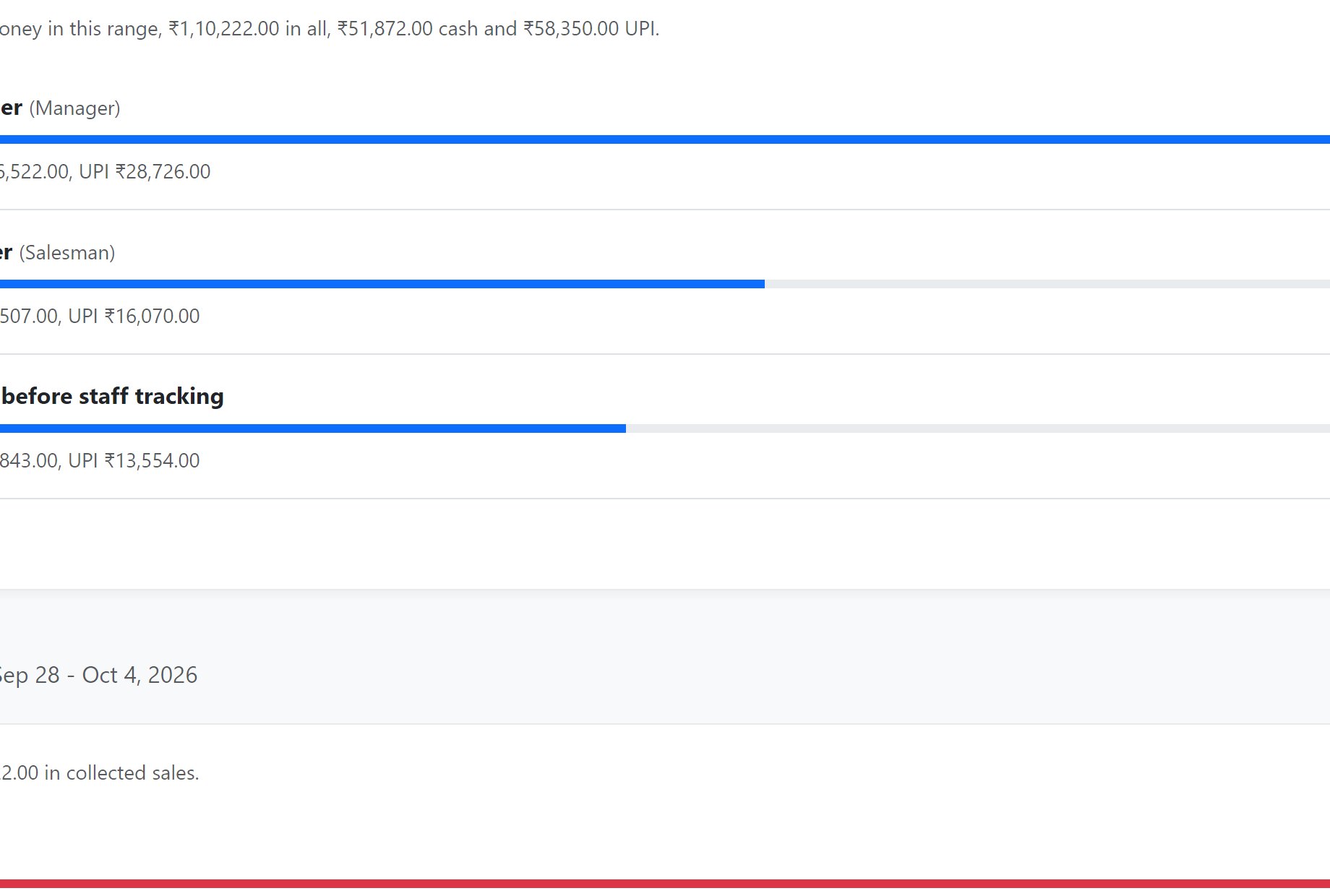
The takings read back by person: what each member of staff took, split into cash and the store's own account, with how many orders each figure came from.

Every payment against a name

A bill can be settled in two parts, in two different ways, by two different people. Cash, Card and who took it are recorded against each payment, so the day's takings can be read back as how much came in notes, how much on card, and which person took it.

Closing the day at the till: the cash the drawer opened with, the cash counted out, the cash taken, the cash the books say should be there, and the difference between the last two.

The drawer, counted against something

Open the day with the cash you put in the drawer, close it with the cash you counted out, and read the difference before you lock up. A day nobody counted says "not counted" rather than zero, so a missing count never looks like a drawer that balanced.

The VAT summary on the owner's screen: the tax collected, the sales it was collected on, and the rate it was charged at.

VAT invoices that stay put

Switch tax on and every bill keeps the rate it was made with. Changing the rate later never changes an old bill. The owner's screen adds up the taxable value and the VAT collected for any date range, and the file you download carries both columns for your accountant.

Delivery settings: the charge, the smallest order accepted, and the distance bands with what each band costs.

Delivery priced by distance

Set bands like 2 to 5 km for £2, and free over a value you choose. The customer picks the band and sees the charge before ordering. A phone order is recorded the same way, as a pickup or a delivery, with the address and a note for the driver.

The offer banner above the customer menu, with its headline, its badge and the hours and minutes left to run.

An offer banner with a countdown

Put a line at the top of the menu, tie it to a category, and let it hide itself when the offer is over.

Combo settings: the best selling drink, the best selling combo and the recommended pair, worked out from the store's own orders.

Suggestions from real sales

A combo and a recommended pair, chosen from what this store actually sells rather than from a list picked in advance.

The account tab on the customer menu, where a saved mobile number shows the orders placed with this restaurant.

Customers keep their own history

A number and a name, and the customer can see their past orders without making an account or a password.

The reporting range with the export buttons beside it: the day book, the VAT file and the full order export.

A file for the accountant

Orders for any date range in one file, with plain numbers a spreadsheet can total on its own.

Store settings showing the trading day, the time zone and the opening hours the menu publishes.

Your day, your hours

A kitchen that runs late can start the next day at 5 in the morning instead of at midnight, and each store keeps its own time zone. Your opening hours show on the menu and on the page a closed shop shows, and the reports and the file you download follow the same day.

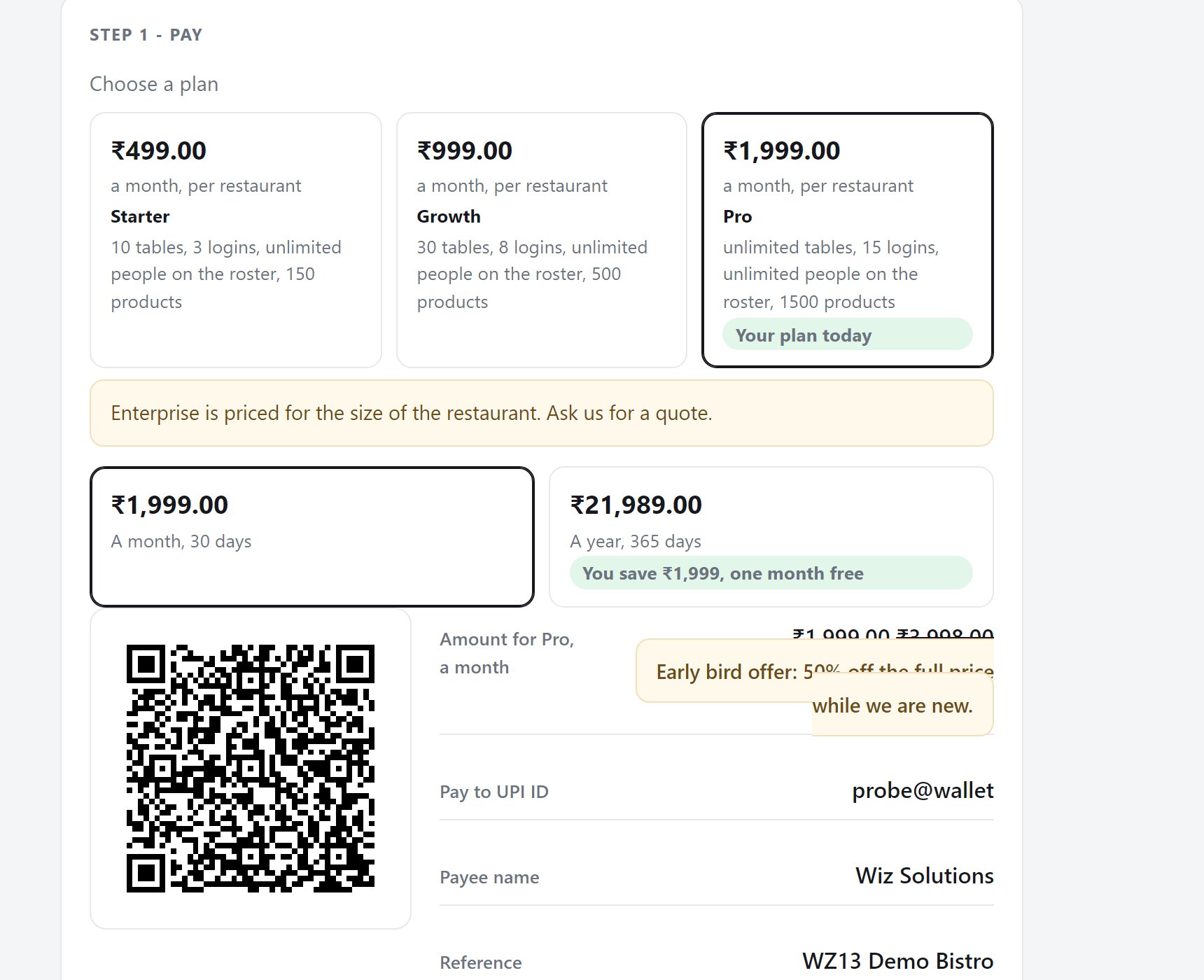
The subscription page: the package in use, the monthly and yearly price, and what each package holds.

Change your package yourself

Your own subscription page shows the package you are on, the price for a month or for a year, and how to pay. An upgrade starts as soon as the payment is confirmed. A downgrade starts when the period you have already paid for ends, so nothing you paid for is taken away early.

The subscription state: the package is active and the page shows the date it is valid until.

A late payment does not close the kitchen

There are 48 hours of grace after a period ends, so a renewal that is a day late does not stop service. After that the menu pauses instead of breaking, and every past order, customer and report is still there when the store is renewed.

The order tablet in the shop: a tile for every section of the menu, with no sign in and no phone needed.

An order tablet for the counter

Every store has its own order tablet page. Open it on a tablet at the counter and customers order without a phone, a QR code or a sign in. The order arrives at the counter marked as coming from the tablet, the money is taken at the till as usual, and a basket nobody came back for clears itself, so the next customer starts clean.

The menu filling a wide screen, one tile for each section, so the whole menu can be read from the door.

A menu that fills a screen

On a phone the menu is one column. On a monitor or a screen on the wall it spreads across the width with a tile for each section, so a cafe that shows its menu on a screen gets the whole menu at once instead of a stretched phone page.

The product catalogue listing twelve kinds of kitchen, each with its own menu ready to load into the store.

Add a second kind of kitchen

A bakery that starts serving coffee, or a hotel that wants a menu of its own for its evening grill: taking a second kind later adds its dishes to what is already there and recognises the dishes the store already sells, so nothing appears twice under two names.

Simple pricing for every kitchen

Pick the size you are today. Move up whenever you outgrow it.

7 days free

Every feature switched on. No card, no setup fee.

Create Your Store

A year costs about 29% less than twelve monthly payments. That is roughly 3½ months free. The year is the lower price because it is settled in one payment up front; monthly is the same screens and the same limits in smaller amounts.

Lite

One counter, one device

£6 £51 per month per year

Save £21

  • Up to 150 dishes, unlimited tables
  • Two logins, one screen
  • VAT billing and daily reports
  • 3 months of report history
  • Works offline, prints at the counter
Start with Lite

Resto

Cafes, takeaways, cloud kitchens

£19 £161 per month per year

Save £67

  • Unlimited menu items and table QR codes
  • Up to 10 staff logins
  • No charge per screen or per terminal
  • Counter, kitchen screen and waiter app
  • QR ordering for tables and pickup
  • Delivery, priced by distance band
  • VAT billing and daily reports
  • 3 months of report history
Start with Resto

Resto Pro

Large halls and hotels

£28 £237 per month per year

Save £99

  • Everything in Resto Plus
  • Up to 40 staff logins, 15 more than Resto Plus
  • Full report history, with no one-year cut-off
  • Discount and void audit: who gave money away, and why
  • Profit statement: expenses, food cost and what is actually left
  • Service charge and packing charge, set per store
  • Which dishes earn, not just which sell
  • Five owner logins: you, plus four who can only read the reports
Start with Resto Pro

Enterprise

Groups running more than one kitchen

Custom quoted for your size

  • No ceiling on anything, including report history
  • Unlimited branches, each in its own country and currency
  • Stock and staff transfers between branches
  • One dashboard across every branch
  • Menus and prices pushed from head office
  • Franchise controls: a branch cannot edit what head office fixed
  • Menu, hours and codes set up with you
  • Somebody to ring when the kitchen is busy
Contact sales

Not ready to decide? The demo is the real app with a sample menu and live orders. Walk through every screen as long as you like.

Get Demo

What a delivery app keeps

Set the numbers to yours. This is arithmetic, not a promise.

£800£18,000
15%30%
Commission in a month£700
Commission in a year£8,400
WizPOS for a year on Resto Plus£195

Difference in your favour

£8,205

Commission rates vary by app, city and category, which is why the rate above is yours to set. WizPOS is the Resto Plus package at £23 a month, or £195 for a year. That is about £81 less than twelve monthly payments, and no share of any order is taken.

Your business, kept to yourself

Restaurant data is worth something to somebody, so the dull questions are answered first.

One store's own floor: its own tables, its own bill waiting to be cooked, its own money. Nothing on this screen comes from another store.

One restaurant cannot see another

Every store's orders, menu and customers are kept apart. Signing in to one store gives no route to another's data.

A kitchen ticket: what to cook, how long it has been waiting, and no prices or totals anywhere on it.

The kitchen never sees money

Orders reach the kitchen screen with prices, totals and payment status removed. What to cook, nothing else.

Customer numbers stay with the restaurant

A customer's name and mobile number are visible only to the store they ordered from, never to another store.

The sign in screen: an email and a password, and nothing on the screen that can show one back.

Passwords are not readable

Passwords and PINs are scrambled in a way that cannot be turned back. Nobody can read one out again, not even the team that runs WizPOS.

Taking money for a bill at the till: the amount being settled, the button that puts it in the drawer, and the button that puts it through the store's own account.

The money goes straight to the store

Payments go to the store's own account or into its own drawer. WizPOS has no wallet, no payout account and no cut.

One person on the team list, with the controls that book their time off and switch their login off.

Leaver proof logins

Switch an account off and it stops working at once, on every device it was signed in on. The account is never deleted, so past orders still carry the name of whoever sold them.

Questions, answered

Do my customers need to download an app?

No. They scan your QR code and your menu opens in their browser. There is nothing to install, and they do not need an account to order. They can optionally save their number to see their past orders later.

Your staff are the ones who can install something: the same till runs as an Android app, so the counter opens on the phone in somebody's pocket instead of a browser tab. Get the app.

What equipment do I need?

At minimum, you need two mobile devices you already own: one for the manager or counter and one for the kitchen screen. If you have additional staff, they can use their own phones to manage orders. Larger touch screen tablets and monitors are also fully supported.

Your restaurant can start using the system with your existing mobiles, tablets, or computers connected to the internet. An old tablet, spare monitor, or any device with a web browser is enough. There is no special hardware to buy, no POS machine required, and no card reader to rent.

Can customers order from a tablet in the shop?

Yes. Every store has its own order tablet page, which opens on a tablet at the counter with no sign in and no address to remember. The order reaches the counter marked as coming from the tablet, the money is taken at the till as usual, a basket nobody came back for clears itself, and a finished order resets the screen for the next customer.

It is a second way in rather than a replacement: the QR codes, the counter and the kitchen all see the order in the same place.

What happens if my internet goes down?

The counter keeps selling. Sales are written to that device and shown as waiting, then sent to your books by themselves the moment the connection returns, still timed at the minute they were taken. The till keeps selling on its own for up to 7 days.

Customers ordering from a QR code need the internet, so it is worth having a mobile hotspot ready for the kitchen during service.

Can I use my own menu?

Yes. Either add your items yourself, or start from the menu that comes with the kind of kitchen you run: twelve kinds, each opening with between 40 and 60 dishes already priced and filed in their own sections. Delete the dishes you do not serve, change any price, and add your own up to your package's menu size. The catalogue behind the twelve holds 922 dishes, most of them with a photograph already.

How does the menu for my kind of kitchen work?

Opening a store asks one question about the food: biryani and pulao, pure vegetarian, Arabic grill and mandi, a nadan hotel, a cool bar, a bakery, burgers and fried chicken, pizzas and Italian, Indo-Chinese, desserts and ice creams, South Indian breakfast, or street food and chaat. The one you pick decides which sections your menu opens with and fills them with dishes that are priced and ready to rename.

Take a second kind later, when a bakery starts serving coffee or an evening grill deserves a menu of its own. Its dishes are added to what is already there, and the dishes the store already sells are recognised rather than added again, so nothing appears twice under two names.

Does it tell me what the food costs?

Yes, once a dish has its recipe. A recipe is the list of ingredients in one portion, entered in the units the shelf uses, and the cost is worked out at what those ingredients cost today. Against the day's takings that becomes food cost as a share of what was sold, which the owner sees on their own screen.

A dish with no recipe is not a problem. It sells exactly as it always did, and it simply has no cost until somebody writes its recipe.

Will it tell me what to buy?

It will once an item has a reorder level. Everything under its level joins the list, with the days it will last at the rate the kitchen is really using it, and one button puts the whole list onto a delivery at the amount to buy. The same list can reach the store's own inbox at eight in the morning, so somebody can order before the day starts.

An item nobody is using gets no days figure rather than a flattering one, because a shelf that is not moving has no rate to divide by.

Do I have to count the stock every day?

No, and most kitchens will not. A sale takes its ingredients off the shelf through the recipe, a delivery bill puts them back on, and wastage takes out what was thrown away. A count is there for the times something disagrees with the shelf, and it is recorded as a correction with a reason rather than as a quiet overwrite.

What happens to the ingredients when an order is cancelled?

It follows the kitchen rather than the paperwork. A bill cancelled before the kitchen touched it puts its ingredients back, because nothing was used. A plate that was cooked and then thrown away keeps its cost, so a day that wasted a meal cannot look better for the cancellation. A bottle of water that goes back in the fridge was never cooked, and a bill merged into another puts nothing back at all.

Do you take a commission on my orders?

No. You pay a fixed price for the package you are on, whether you choose the month or the year, whatever you sell. Delivery apps take a cut of every order; this does not.

Is there a contract or a setup fee?

No contract and no setup fee. You pay month by month, or for a year if you would rather settle it in one payment. The year costs about 29% less than paying monthly, roughly three and a half months free, and that is the only difference between the two: the software, the screens and the limits are identical. The year is the lower price because it is paid once, up front; the monthly price is the same product in smaller payments. The store and the menu are put in place with you before the first payment.

Can I change package later?

Yes. Your subscription page shows the package you are on and the price for a month or for a year, and you choose another package there. An upgrade starts as soon as the payment is confirmed. A downgrade takes effect when the period you have already paid for ends, so you keep what you paid for. You can move to paying for a year at any time, and the year is the lower price because it is settled in one payment rather than twelve.

How does this price compare with other POS software?

Much of the software in this market is sold as a base plan plus modules: the price you see advertised is normally billing and reports, and operations, inventory, marketing and hardware are quoted separately on top. That is not a trick, but it does mean the advertised figure is the beginning of the cost rather than the whole of it.

WizPOS is quoted as one price for the whole product, per restaurant. The kitchen screen, the waiter app, QR ordering, delivery, stock and purchasing are all inside the package, there is no charge per screen or per terminal, there is nothing to install, and there is no setup fee. A year is one payment and costs less than twelve monthly payments.

So the useful comparison is the total for everything you need, not the headline. If you are holding a written quote, send it to us and we will price the same scope against it.
Is there a free trial?

Yes. Seven days with every Resto Pro feature switched on, no restriction in the middle of it, and no card asked for at any point. On the eighth day you pick a package or you do not, and either way there is nothing to uninstall, because nothing was installed to begin with.
The trial is one per business: one GSTIN, one phone number or one shop address, whichever we see first. A second store for the same business starts on a plan, and if you run two branches and think that is unfair, write to us and we will sort it out.

What happens if I stop paying?

The store keeps trading for 48 hours after the period ends, so a renewal that is a day late does not stop service. After that it stops taking new orders until it is renewed, and nothing is deleted. Every past order, customer and report is still there when you come back.

Can I try it with my own menu first?

Yes. Open the demo, or ask, and a store is set up with your own dishes, so the staff can see their own screens before anything is committed to.

Can I get my data out of it?

Yes. Reports export as a CSV file that opens in any spreadsheet, with the taxable value and the tax collected as separate columns rather than as one total inside a picture, so an accountant can work from the file directly. The orders, the customers and the menu belong to the store, on every package, and they can be taken away whenever the store wants them.

How many logins do I get, and how do I add someone?

The owner login is included, and a package adds staff logins on top of it: 10 on Resto, 25 on Resto Plus, 40 on Resto Pro, and no limit on Enterprise. Each person gets their own account, with a name and either an email and password (owner and manager) or a username and a 4 digit PIN (kitchen and counter), which is far faster on a shared tablet. You add them yourself from the Team screen, and switch an account off the day somebody leaves. A switched off account stops working at once and is signed out on every device, but it is never deleted, so a leaver's past sales keep their name on them. Switching somebody off does not free up their login: the package counts the seats you have taken, not the ones in use.

The team roster is a separate list and it has no ceiling on any package, because most of a kitchen never signs in at all. The tea maker, the juice maker, the cleaner and the delivery rider belong on it, and none of them needs a screen. Every person on that list can be allowed to ring up sales and take money, because the package counts logins rather than people: a kitchen of eight on Resto works as long as ten of them have a login between them. What you call the job is yours, and giving somebody a longer title never buys another selling place.

Does it work out my staff salaries or payslips?

No, and it is not meant to. What the team screen records is time and presence: who is on the roster, who turned up, who is on shift this week, and who has time off booked. It holds no wage, no deduction and no amount payable, and nothing in it produces a payslip.

Salaries are the one part of running a kitchen that has legal consequences if software guesses, and every restaurant already has a way it does them. Keeping them out means this stays a system your staff can be trusted to open.

See the whole thing before you decide

The demo is the real app with a sample menu and live orders. Walk through the counter, the kitchen screen and the reports as long as you like.